Week 4b: Upwards and Onwards
- Feb 9, 2020
- 3 min read
This past week we dedicated our efforts towards hardware improvement and software development.
Alex Esclamado
This past week I worked to better understand changes to the system as well as to gain insight on the next steps for the project.
To recall, the Tektronix MS054 was employed to hopefully utilize its high sample rate with a smaller bandwidth tradeoff. This seemed favorable compared to the DSA 72004C with a high bandwidth but a lower sample rate than its specifications. However, difficulties with the scope surfaced. Primarily in regards to the FastFrame application of the scope, it was found that while it captured data quickly, it performed its own processes before the user is able to obtain and see the data. In essence, the raw data is inaccessible and the overall speed of the system is slowed due to waiting for these processes to finish. Additionally, with a dual probe system currently installed, the partial waveform displayed is very grainy due to the two images being superimposed with too much dispersion. This coming week, I plan to experiment with different dispersion lengths in addition to blocking one probe to get a better visualization on the scope.
After discussing workarounds for the 72004C with the graduate student, we came to two assumptions. One being that the I/O interface on the back seems to demonstrate two separate components, the motherboard and a PCIe slot occupied by the GPIB. Secondly, we believe that we could potentially open up the scope, noninvasively detach the PCIe and occupy this slot via an extension so that the workstation effectively becomes the oscilloscope. In this scenario, we would eliminate the data transfer speed disparity that we have been experiencing when using this scope. The only additional work after this operation includes driver and IOS updates for the scope. The major point of consideration is that the warranty is void if the seal is broken when inspecting the scope. However, it is believed that this scope is already improperly functioning.
Trevor Wong
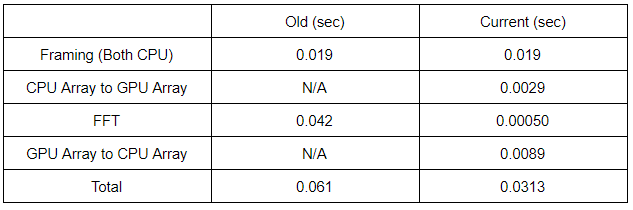
This week I looked into the processing code used in our project and concluded that the fft is performed by NumPy. NumPy is a library that adds support for large, multi-dimensional arrays and matrices. Due to this CuPy may be a better alternative to PyCUDA. CuPy is an open-source matrix library accelerated with NVIDIA CUDA which has access to the cuFFT library. CuPy is highly compatible with NumPy, allowing for a more familiar integration. The newest version of CUDA that CuPy is compatible with is CUDA 10.1, while the current version we have is 10.2. Thus in order to test CuPy I needed to revert to the older version of CUDA. After multiple compatibility issues, I was able to get a version of CuPy running. I tested simple array code using CuPy to test its functionality and so far all is good. CuPy has promise and hopefully it will not have all the compatibility issues and setbacks encountered with PyCUDA. My next step is to code and compare a NumPy FFT with a CuPy FFT.
In terms of the laser program, there seems to be an error on all of the programs that are used for the laser. They all have the error:
Cannot run program “C\ProgramData\Anaconda3\envs\OCT_LMU\python.exe” CreateProcess error=2, The system cannot find the file specified.
This is an error I have not encountered before, and the last time I ran the system there were no problems. Thus someone may have changed something with the Python interpreter and I need to find out how to return its functionality.
Comments